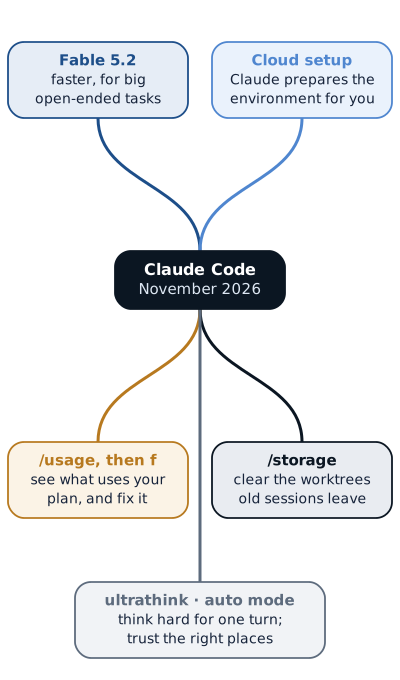
The Claude Code team’s newsletter reached my inbox on Tuesday evening, 10 November, with a new model in the subject line, and I expected the model to be the story. It turned out to be one item among many, because most of what the team shipped over the past few weeks is less glamorous and more useful: cloud sessions that prepare their own environment, commands that show where your plan is going and offer to fix it, a way to reclaim the disk space old sessions leave behind, and a handful of quiet changes that make long conversations cheaper. What follows is a walk through all of it, in the order I think it matters to someone who uses Claude Code every day, with my own reading marked as mine and everything else taken from the newsletter and the official changelog.
Fable 5.2, and why the team still points you to Opus
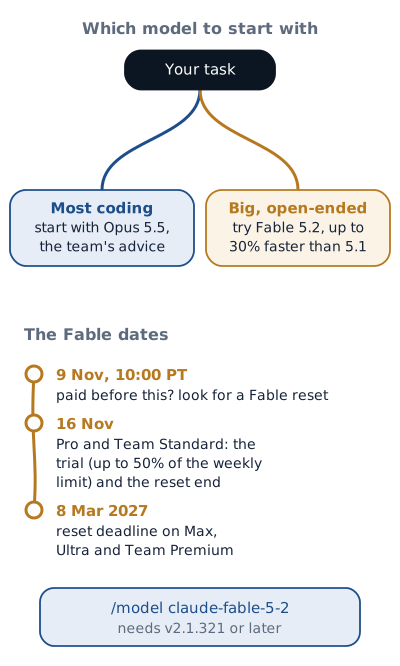
Fable 5.2 generates its output up to 30% faster than Fable 5.1, and the team
describes it as a great model for big, open-ended tasks. What I found more telling
is the advice that follows in the same paragraph: for most of your coding, they
would still start with Opus 5.5. That is the people who build the tool telling you
that the newest model is not automatically the right default, which matches what I
have seen in my own work, where the fit between the task and the model matters more
than the model’s release date. If you want to try it, switch with
/model claude-fable-5-2, which needs Claude Code v2.1.321 or later.
The access rules have dates attached, so they are worth reading carefully. On the Pro and Team Standard plans, Fable is included this week for up to 50% of your weekly limit, through 16 November; past that, it draws on usage credits if you have turned them on. Anyone who was a paid subscriber before 9 November at 10:00 PT may also find a Fable reset under Settings › Usage on the web and desktop apps, which must be used by 16 November on Pro and Team Standard, or by 8 March 2027 on Max, Ultra and Team Premium. If you are on Pro, my suggestion is to save a genuinely large, open-ended task for this week, because that is where the model is meant to shine and where the trial tells you the most.
Cloud sessions now set up their own environment
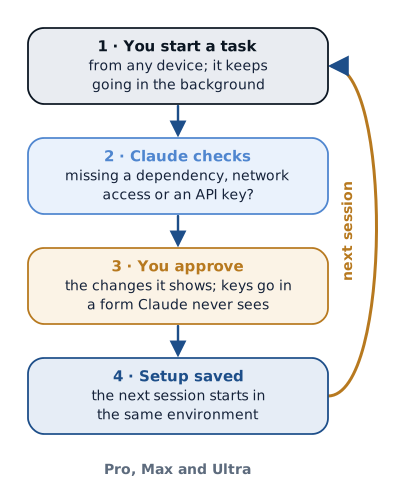
Cloud sessions run a task on Anthropic’s infrastructure, so you can start it from any device and let it keep going in the background, and the one chore they still left to you was preparing the environment: the dependencies, the network access and the keys your project needs. On Pro, Max and Ultra, Claude can now do that part too. When a session is missing a dependency, network access or an API key, Claude tells you and shows the changes for you to approve; an API key goes into a form, so Claude never sees the key itself; and the setup is saved, so the next session starts from the same environment. The details are in the cloud environments documentation.
Three smaller changes in the changelog point in the same direction. Since 2.1.318, a cloud session on an Anthropic-hosted environment can start with a No repository option, for the tasks that do not need code at all. Since 2.1.314, a failing setup script no longer stops the session from starting on the web, desktop and mobile apps; the session starts anyway, and you deal with the failure inside it. And since 2.1.312, routines that run in the cloud let you pick an effort level when you create or edit them, which means a nightly routine does not have to think as hard as the task you are watching.
Seeing where your plan goes, and fixing it
If you have ever watched a weekly limit drain faster than you expected, as I have,
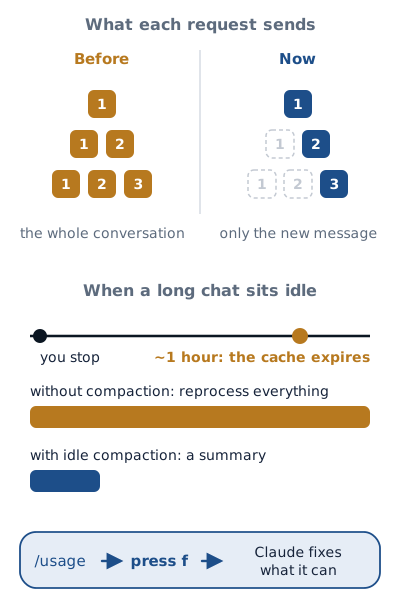
this is the section to read twice. /usage in the CLI already showed what had used
most of your plan; it now also shows how to fix it, and pressing f sends Claude
Code a prompt to fix whatever it can on its own. The
usage documentation explains what it
measures.
Several changes cut the cost without asking you anything. Claude Code used to send
your whole conversation with every request, and for most people it now sends only
the new messages, which is why long conversations start responding sooner. It also
compacts long idle conversations shortly before the prompt cache expires, after
about an hour, and shows a banner when it does: resuming a conversation whose cache
has expired means reprocessing its full context, and a summary is far cheaper to
reprocess than the whole thing. You can turn that off in /config, and since
2.1.314 the same idle compaction works in VS Code and in the desktop app’s Code tab
for conversations over 200K tokens. Switching models now asks the model you were on
to summarize the conversation first, when it is too long for the new one. And in
2.1.316 the team fixed a cost I had never thought about: each status-line update in
the terminal used to re-read a background subagent’s whole conversation, and it now
works from short notes instead, which in their own test on Pro and Max made sessions
with background subagents use about 5% less of the limit.
Freeing the disk that old sessions leave behind
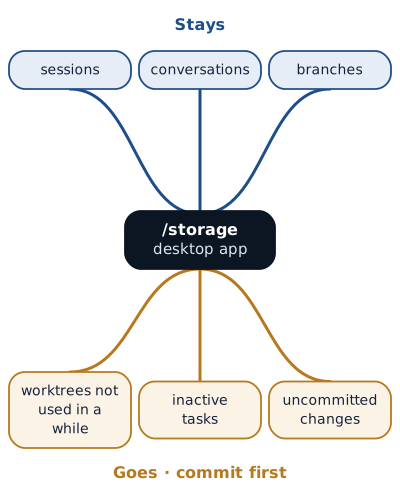
Every session that works in its own git worktree leaves a copy of the repository on
your machine, and those copies add up; I keep a separate worktree for each article
on this site, so I know how quickly they pile up. In the desktop app you can now see
how much space your sessions and worktrees take under Settings, or type /storage,
and clear the worktrees you have not used in a while, together with inactive tasks.
Your sessions, conversations and branches all stay, but uncommitted changes leave
with the worktree, so commit them before you clean up.
Thinking harder for one turn, and trusting the right places
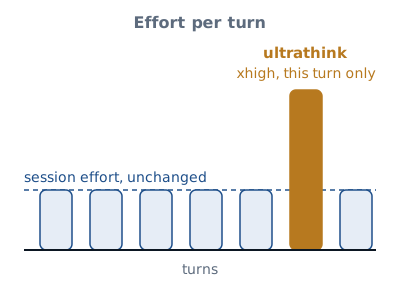
Ultrathink is back. Writing it in a prompt asks for the xhigh effort level on
that turn alone, without changing the effort of the whole session; the team is
candid that most tasks do not need it, and that it earns its place when Claude is
genuinely stuck. The model configuration page
covers effort levels.
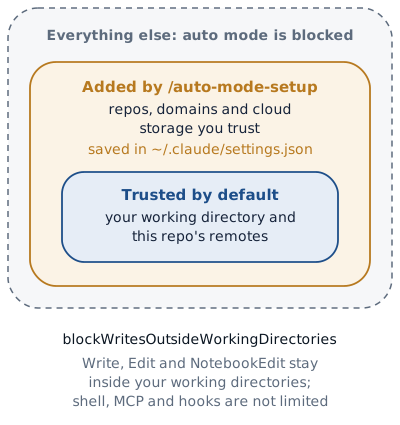
Auto mode, by default, trusts only your current working directory and the
repository’s own remotes, which is a sensible start that becomes friction the
moment Claude needs to push to another repository your team owns or send something
to a service you use every day. /auto-mode-setup looks at your project and the
commands Claude ran in your recent sessions there, drafts a list of the
repositories, domains and cloud storage you trust, and saves it to
~/.claude/settings.json once you accept it; the
permission modes page explains
how auto mode decides. On the stricter side, 2.1.314 added
permissions.blockWritesOutsideWorkingDirectories: when you turn it on, the Write,
Edit and NotebookEdit tools refuse any path outside your working directories in
every permission mode, apart from some of Claude Code’s own files. Read the limit
as carefully as the promise, though, because it does not restrict shell commands,
MCP tools or hooks.
The smaller changes
The rest of the list is short, and some of it changes habits:
| Version | What changed |
|---|---|
| 2.1.318 | Claude Code no longer installs the IDE extension when started in an IDE terminal; use /ide from an outside terminal, or your editor’s extensions view |
| 2.1.302 | Fork subagents, which inherit your full conversation, are on by default in the desktop app and VS Code, as they already were in the terminal |
| desktop | Messages you queued in a local session come back when you reopen the app after it quits, updates or crashes |
Two habits from the team itself
The newsletter closes with two practices from Anthropic’s own engineers, and both are worth stealing. The first deals with an agent that stops to wait for a decision it is not sure you made; one engineer gives it the go-ahead upfront, and says it unblocked a large team of agents:
Just build and use your best judgment. Make any call that’s reversible yourself, and check in later with the calls you made.
The second replaces a debate about whether a design is flexible enough with an experiment, which you can delete afterwards:
In a separate worktree, do a throwaway build of [a feature we might add later] on top of this design. Don’t polish it, just tell me where the design got in the way.
They also wrote up how the Claude Code team does code review, where Claude reviews most changes before a person is asked to look, with instructions for setting up the same.
What I would do this week
If I had to pick, I would start by updating Claude Code, because several of these
fixes simply arrive with the new version, and then run /usage and press f, since
it is the one change that pays for itself the same day. After that, /storage in
the desktop app, after committing anything you care about; /auto-mode-setup, if
auto mode keeps stopping at the edge of your own repository; and, on Pro, one large
open-ended task given to Fable 5.2 before 16 November, so that you decide on
evidence rather than on the release notes whether it earns a place next to Opus in
your work. The full list of what shipped is in the
changelog, and if you hit a bug,
/feedback inside Claude Code sends it straight to the team.
Sources: “What’s new in Claude Code: Fable 5.2, easier cloud setup, and more”, the Claude Code team’s newsletter of 10 November 2026; the Claude Code changelog (versions 2.1.302 to 2.1.321) and the documentation pages linked above, consulted on 11 November 2026.